Step by Step Basic Protocol
Last Updated: 01/22/2025 – revised to reflect current year and make minor changes
Click here for Data Entry Cheat Sheet and here for a Tag and Flower Additions document
Thank you for joining the effort to monitor native bees at Torrey Pines State Natural Reserve! Each monitoring survey is expected to take roughly 1-2 hours, and is designed to be fun and engaging and not too onerous.
To participate in the project, you will need the following:
- iNaturalist Account: sign up for free at www.inaturalist.org
- Camera: A digital camera and/or a smartphone with a decent camera (most phones less than 5 years old will do)
- Your own transportation to Torrey Pines
Step-by-Step Instructions for Bee Surveys
- Before you start…
- If you wish to perform a survey at the Margaret Fleming Trail in the Extension, it is a current requirement of the Supervising Ranger that it must be done by a Torrey Pine docent or you must be accompanied by one.
- Don’t forget to bring sunscreen, a hat, and water. Wear comfortable clothes and sturdy shoes or hiking boots.
- Be mindful of the public, vehicle traffic, wildlife, and bumps on the trails.
- STAY ON TRAILS AT ALL TIMES.
- Arrive at the start point of the monitoring route, between 9:00am and 2:00pm. Surveys are done between 9:00am and 3:00pm.
- Make sure that your phone and/or camera have the correct date and time setting! This information will be automatically added to your observations when you upload them to iNaturalist.
- Surveys are currently set for 1 hour at each monitoring route (if this changes, we will update the page). When you start your survey, open any weather app on your phone that shows the current weather conditions at your location. Take a screenshot. This will give us a timestamp for when the survey started, and what the conditions are like. You will transcribe this information as part of your first bee observation (see step-by-step instructions for uploading observations).
- Set your timer to 1 hour, or start your stopwatch, and begin your survey! Walk slowly from the start point to the end point of the monitoring route and photograph native bees that are visiting blooming plants.
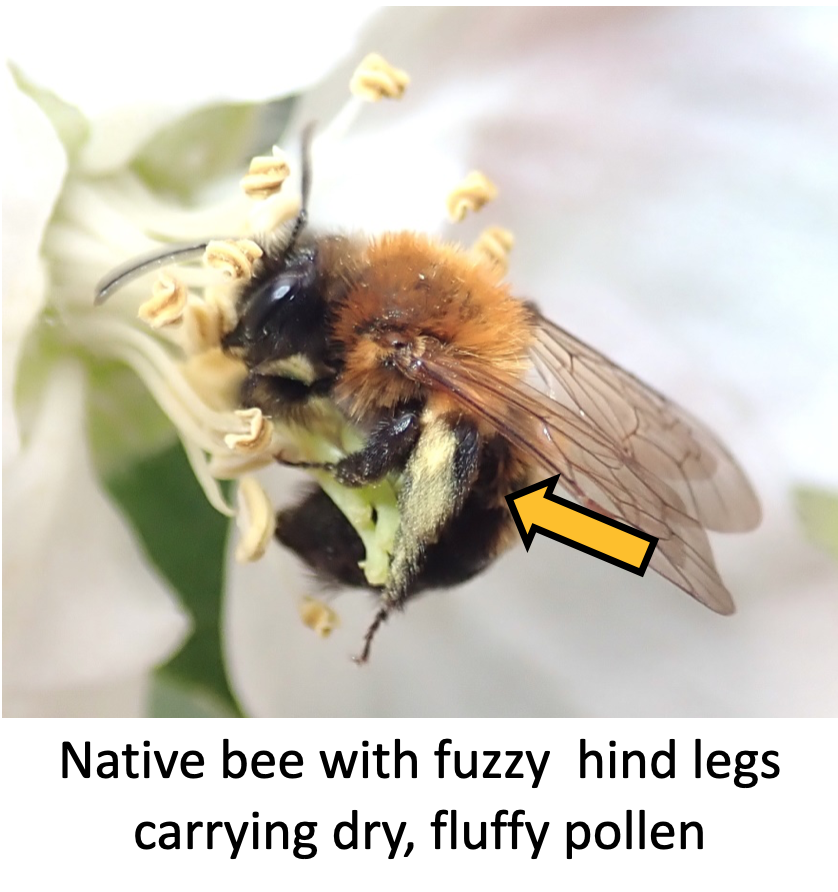
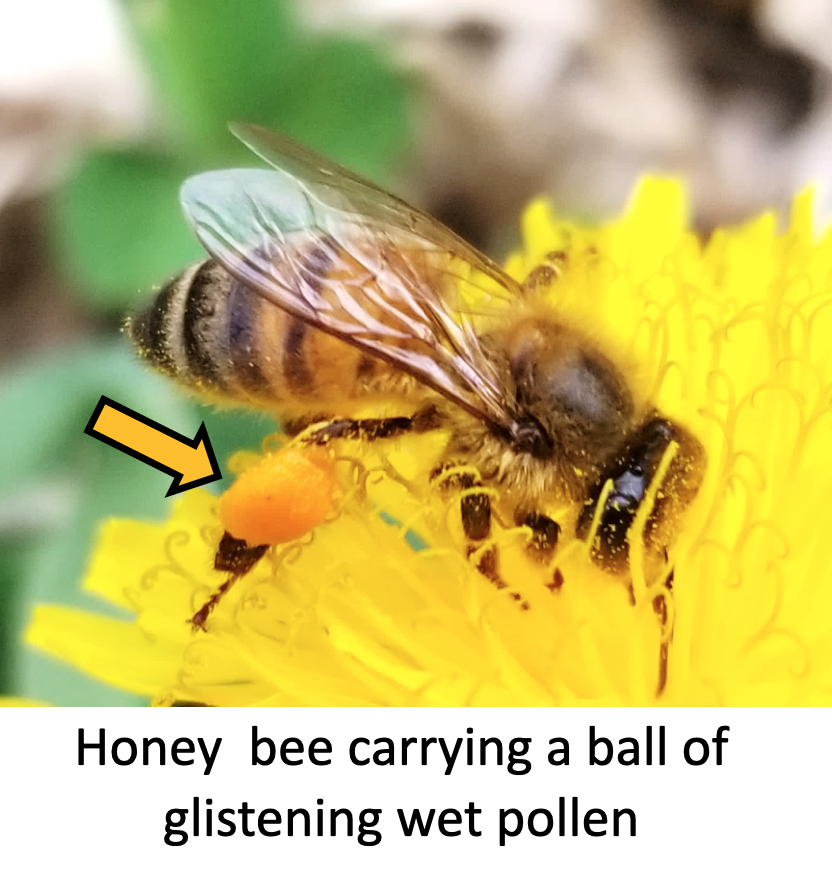
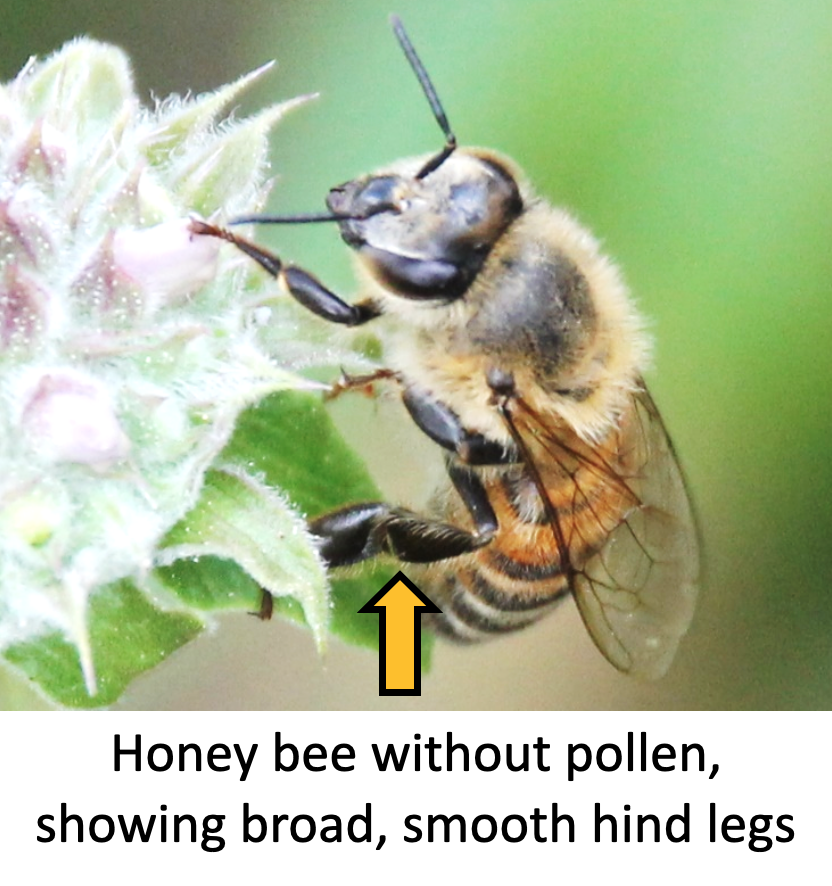
- You do NOT need to photograph honey bees. Honey bees are not native to North America, but are abundant in our area (likely the first bee you’ll bump into on your walk!). Honey bees come in different colors from all black to mostly light orange, but they are larger than most of our native bees, fly more slowly while foraging, and can be recognized by their smooth and shiny hind legs, which often bear a ball of moist pollen—unlike native bees, which often have fuzzy hind legs and carry fluffy, dry pollen (see example below. Click on any image to enlarge). If you’re not sure whether the insect is a honey bee or a native bee, photograph it.
- Native bees come in many sizes, shapes, and colors. When in doubt, photograph and upload any insect that you suspect might be a native bee.
- If there are many bees visiting flowers on one plant or one patch of plants, take photos of 5 individuals of each distinct “kind” you see, and then move on, so that you don’t get stuck for too long at one place. It’s ok to include multiple bees in the same shot, but you will have to upload each individual separately (see step-by-step instructions for uploading observations).
- If possible, photograph the same bee from multiple angles. Different kinds of bees are identified using different body parts, so the more angles, the better!
- Take at least one photo where the entire flower is in view, so that we can identify the plant the bee is visiting. If all of your shots of the bee include only part of the flower, then take an extra photo of the entire flower and upload it in the same observation as the bee.
- Sometimes bees rest on leaves, branches, or open ground. If possible, photograph bees outside of flowers when you see them.
- Feel free to pause the survey to take a water break, tell some passersby about the project, enjoy nature, etc.! When you do, please pause the timer and resume it when you start the survey again.
7. As you walk along the monitoring route, keep a mental checklist of plants that are blooming but receiving no visits from native bees. You will check back on them later.
8. When you reach the endpoint, turn back towards the start point and use the remaining time (out of 1 hour total survey time) to observe the plant species on which you did not photograph any bees earlier during your walk towards the endpoint.
- On your walk back to the start point, walk briskly past the plant species on which you have already photographed many bees, and stop to observe the plant species on which you did not photograph any bees earlier during your walk towards the endpoint.
- If you photographed bees on all plant species on the trail on your way to the endpoint (congratulations!), then focus on the plant species where the fewest bees were seen when you turn back towards the start point.
- When your timer reaches 1 hour, the survey is done! If, at this point, there are any blooming plants on which you did not photograph ANY bees during your one-hour survey window, please take a photo of the plant and upload it along with your bee observations (best if there’s one closeup photo of an entire flower, and one that includes the stem and foliage). At this point, you can feel free to keep photographing bees, BUT when you upload those photos, they should not be tagged with the monitoring project tag.
9. When you complete your survey, take another screenshot of the current weather conditions on your phone. This will also give us a timestamp of the end time of the survey.
10. You’re done! Enjoy the rest of your time at Torrey Pines!
Step-by-Step Instructions for Uploading Observations
Guidance on uploading observations can be found on the iNaturalist help page. In particular, you can click here for a 3-minute tutorial video produced by iNaturalist staff to get you started. We have also put together a couple of helpful diagrams below; and you can also reach out to one of the project leaders if you need additional assistance.
- If possible, try to upload your observations to iNaturalist.org as soon as you arrive back home, so that you can clearly remember what you saw during your survey.
- Each individual bee you photograph should be its own unique observation. This means that you should (1) group separate shots of the same individual bee into a single observation, rather than spread out over different observations, and (2) for photos that contain multiple individual bees, crop out the individual bees and upload them into separate observations.
- In cases where you do have a photo with multiple bees, please place a crop of the individual bee as the first photo in the observation, and also include the un-cropped photo with multiple bees as the last photo in the observation.
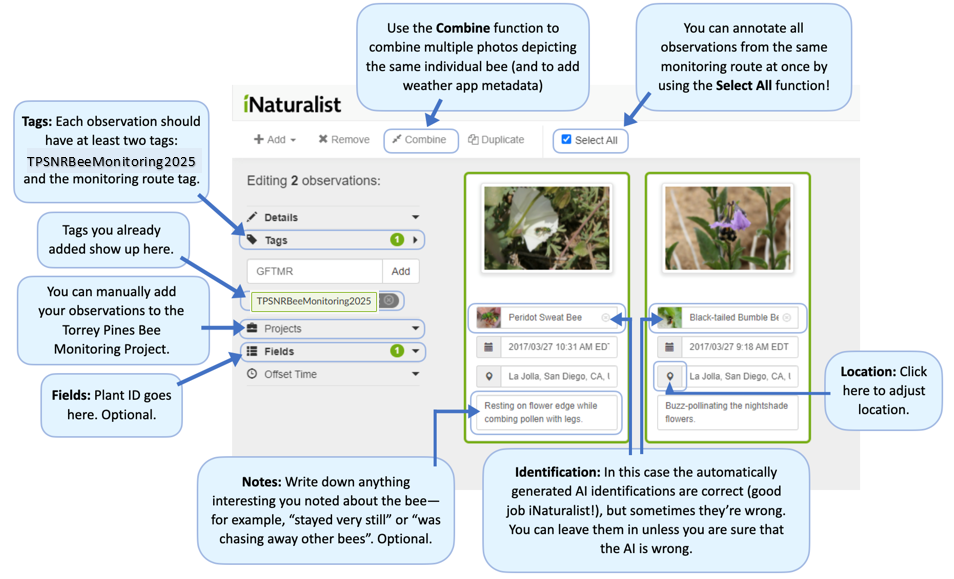
- In cases where you have multiple photos of the same individual bee (hopefully in most cases, since multiple angles are helpful for identification), you can put all your photos onto the upload platform, select the photos that belong to the same individual, and select “Combine” from the top-left toolbar. See this link here for more instructions.
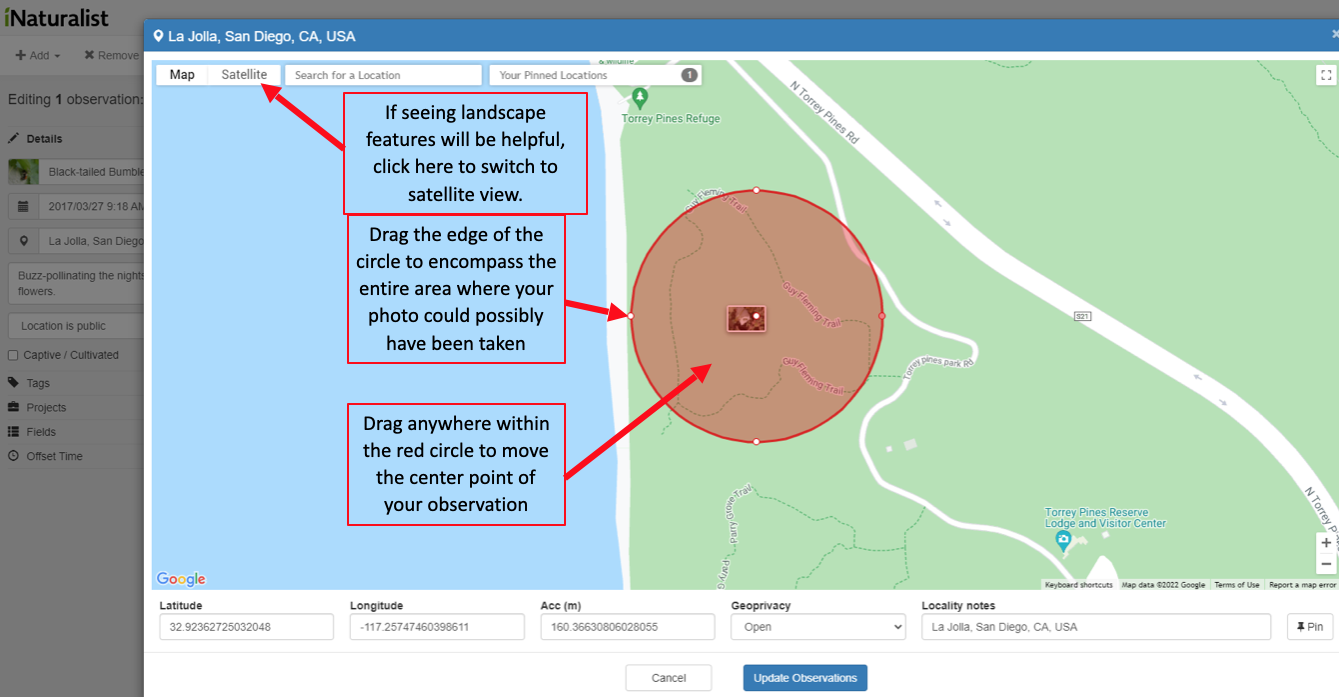
- Adjust the locations of your observations. If you use a camera without a GPS, you will have to set the locations for all observations manually. If you have a GPS-enabled camera or your smartphone with location services enabled, the observations will be placed automatically—but you should still double check them because sometimes your device can be way off!
- See the diagram at the bottom of the page for how to change the location and uncertainty radius of your observation. Don’t spend too much time trying to remember EXACTLY where along the route you took the photo; it is often helpful enough to know very roughly what part of the route the photo is taken (for example, first half versus second half). If you are very unsure, drag out the uncertainty radius to cover the entire monitoring route you walked. It’s better to be imprecise (large error radius) than to be precise but wrong (small error radius but the circle does not actually encompass the location where the photo was taken).
5. iNaturalist will automatically offer their AI-assisted identification of your bee (or plant). They are sometimes very accurate, and sometimes way off. You can feel free to use the computer-generated IDs, or you can delete them and offer your best guess. If you are unsure, you can identify your insect as “Bees (Epifamily Anthophila)”. Project leaders will check EVERY observation uploaded for the project to ensure that the final identification assigned to your observation is correct.
6. Annotating your observations: This is one of the most important parts of the upload process, as it will allow us to properly categorize your observations as part of the bee monitoring surveys! This step is easier to do when you are uploading all your photos from the same monitoring route at once. You may find the diagram below to be helpful.
- Tags:
- All monitoring photos (both bees and plants) taken during your 1-hour surveys should be tagged with “TPSNRBeeMonitoring2025”. Make sure this is spelled correctly, or we won’t be able to find it! We suggest that you copy this tag text to avoid spelling errors. You can use the “Select All” function to apply this tag to all photos you are uploading.
- Photos taken outside of the 1-hour monitoring period should not be tagged with this tag.
- All monitoring photos should be tagged with where the monitoring took place. The tags for each monitoring route are:
- Razor Point Trail West: RPWMR
- Razor Point Trail East: RPEMR
- Parry Grove Trail: PGTMR
- Guy Fleming Trail North: GFNMR
- Guy Fleming Trail South: GFSMR
- North Fork Trail: NFTMR
- Marsh Trail: MTTMR
- Mar Scenic Trail: MSTMR
- Margaret Fleming Trail: MFTMR
- The first bee you observed should include notes copied from the weather app screenshots taken at the beginning and end of the survey (see Notes section below for more details). This observation should be tagged with “BeeMonitoringMetadata” so that we can more easily locate the data.
- If you observe a native bee during your survey, add the tag “YesBee” to your first observation. If you did not observe a native bee add the tag “NoBee” to your first observation (which would be a flower).
- All monitoring photos (both bees and plants) taken during your 1-hour surveys should be tagged with “TPSNRBeeMonitoring2025”. Make sure this is spelled correctly, or we won’t be able to find it! We suggest that you copy this tag text to avoid spelling errors. You can use the “Select All” function to apply this tag to all photos you are uploading.
- Fields:
- If you know what plant species the bee was foraging on, you can enter this information. Click “Fields” and type in “Interaction->Visited flower of” and select that option from the drop-down menu, and then enter the plant species.
- If you are NOT sure what plant the bee was foraging on, leave this blank! We have a great team of botanists who have volunteered to identify the plants in this project.
- Notes:
- This is the freeform section at the bottom of each of the observation boxes (see diagram below). For the first bee you observed, please type out the key details from your weather app into this section. Please include at least the start and end time, the temperature, cloud cover information, and wind (in mph). See below for an example:
Start – 1008, 75F, overcast, 3 mph
End – 1134, 79F, partly cloudy, 4 mph
Remember to tag this observation with “BeeMonitoringMetadata“
- For all other observations, this is an optional section. If there is nothing noteworthy about the particular bee you photographed, leave this section blank and move on.
7. Once you’ve filled everything out, remember to hit the green “Submit” button on the top-right corner. Thank you for uploading your observations!
8. Once they have been uploaded, it may be beneficial to double check the observations to make sure that they came out correctly.
Uploading to iNaturalist Guide
Click image below to enlarge. Opens in a new tab.
Changing Location and Uncertainty Radius
Click image below to enlarge.